You just finished an oil change on your Honda CR-V. Fresh oil in, drain plug torqued, filter tight. But the maintenance light is still on — and the oil life percentage hasn’t moved.
That’s where most owners get stuck. The oil change is done, but the digital reminder doesn’t know that. You have to tell it.
Resetting the oil life on a Honda CR-V isn’t complicated, but the exact steps depend entirely on which generation you’re driving. A 2004 CR-V and a 2022 CR-V share the same Honda badge and the same maintenance philosophy — but the reset process looks nothing alike.
This guide walks through the full procedure for every major generation, explains what the Maintenance Minder is actually tracking, and covers the troubleshooting scenarios that trip most people up.
What the Honda Maintenance Minder Is Actually Doing
The CR-V doesn’t use a simple mileage timer to decide when your oil needs changing. It uses a system called the Maintenance Minder — an onboard computer that monitors how your engine is actually being used.
Variables like engine temperature, trip length, load, and speed all feed into the calculation. The result is an oil life percentage that reflects real-world stress on your oil, not just miles driven.
This is why one CR-V owner might hit 0% at 5,000 miles while another doesn’t reach it until 10,000. City driving, with its short trips and stop-and-go heat cycles, degrades oil faster. Highway miles are relatively easy on oil. The system accounts for the difference.
When running on full synthetic 0W-20 oil (which Honda recommends), most modern CR-Vs will land in the 7,500–10,000 mile service window. That’s the Maintenance Minder working as intended.
Alert Levels at a Glance
- 15% remaining — Schedule service soon
- 5% remaining — Service is due now
- 0% remaining — Oil change is overdue; address it promptly
Understanding the Maintenance Codes

When the light triggers, it doesn’t just say “oil change.” It shows a code — like A, B, B1, or A2 — that tells you exactly what’s needed.
Main Codes:
- A — Engine oil change (oil filter change is strongly recommended alongside this)
- B — Oil and filter change plus brake inspection, parking brake adjustment, and a check of other systems
Sub-Codes (appear alongside main codes):
- 1 — Rotate tires
- 2 — Replace air filter, cabin filter; inspect drive belt
- 3 — Replace transmission fluid (and transfer fluid on AWD)
- 4 — Replace spark plugs; inspect valve clearance
- 5 — Replace engine coolant
- 6 — Replace rear differential fluid (AWD models only)
- 7 — Replace brake fluid
If you see B1, that means a full B service plus a tire rotation. The system tracks each item independently, which is why a partial reset can leave sub-codes active even after the oil is changed.
Before You Reset: What to Check First
The reset process is just an administrative step. It should only happen after the oil change is complete. Resetting before the service doesn’t change anything under the hood — the Maintenance Minder’s accuracy depends entirely on fresh oil actually being in the engine.
Use the right oil. Honda recommends full synthetic 0W-20 for virtually all modern CR-V engines. Some conditions call for 0W-30 — check your owner’s manual to confirm for your specific model year. Synthetic oil is what makes the extended service intervals possible.
Replace the filter. The Maintenance Minder doesn’t track the filter separately, but skipping it during any oil service is a false economy. Honda’s OEM filter (part number 15400-PLM-A02) fits most CR-V model years reliably.
Pre-fill the filter before installation. This is a step that experienced DIYers rarely skip but beginners often miss. Installing a dry filter means the oil pump has to fill it before pressure builds. Pre-filling it eliminates that brief low-pressure window on startup, which reduces wear over time.
Torque the drain plug correctly. The spec for most CR-V models is 30 ft-lbs. Overtightening strips the threads in the oil pan — an expensive mistake. Always install a new crush washer with each drain plug removal.
Check the oil level. After filling to spec, let the engine run for a minute, shut it off, and check the dipstick. The stated capacity is a guide, not a guarantee. Always verify the actual level before driving.
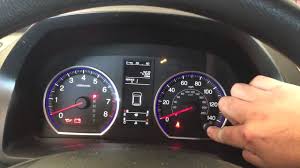
How to Reset Oil Life on Honda CR-V — By Generation
2002–2006 CR-V (Classic Knob Reset)
These early models use a physical SELECT/RESET knob on the instrument cluster.
- Turn the ignition to Position II (ON), engine off.
- Press the SELECT/RESET knob repeatedly until the oil life percentage appears on the odometer display.
- Press and hold the knob for about 10 seconds. The percentage will begin to blink — this signals reset mode is active.
- Keep holding for another 5 seconds until the display shows 100%.
- Turn the ignition off, then start the engine briefly to confirm the maintenance light has cleared.
2007–2016 CR-V (Steering Wheel Button Reset)
This generation uses either a dash-mounted SELECT/RESET button or steering wheel controls to interact with the multi-information display.
- Turn the ignition to Position II (ON), engine off.
- Use the SELECT/RESET controls to cycle through the display until “Engine Oil Life” or the oil life percentage is shown.
- Press and hold the SELECT/RESET button for approximately 10 seconds. The indicator will begin blinking, confirming it’s in reset mode.
- Pay attention here: If the display reads “Engine Oil Life” (text), release the button and then press the Info button on the steering wheel to confirm the reset. If it reads the percentage, continue holding for another 5 seconds until it resets to 100%.
- Turn the ignition off, then restart the engine to verify the light is gone.
The two-stage hold is the step where most people fail on these models. The system requires both a trigger (blink) and a confirmation (hold). If you release early, the reset won’t complete.
2017–Present CR-V (Digital Cluster and Touchscreen Reset)
Newer CR-Vs split the procedure by trim level. Standard trims use the instrument cluster and steering wheel; premium trims use the central infotainment screen.
Standard Trims (LX, EX, Sport)
- Set the power mode to ON (or start the vehicle if required).
- Press the HOME button on the steering wheel to open the information menu on the instrument cluster.
- Use the left selector wheel to scroll to Settings and press to select.
- Scroll to Maintenance Reset and confirm.
- Select Engine Oil Life or choose All Due Items to clear everything at once, then confirm the reset.
Premium Trims (EX-L, Touring, Hybrid)
- Start the vehicle and put it in Park.
- On the central touchscreen, tap the Settings icon (gear or wrench symbol).
- Select Vehicle.
- Tap Maintenance Info or Maintenance.
- Select System Reset or Reset Items.
- Choose the items to reset — or select All Due Items — and confirm.
Troubleshooting: When the Reset Doesn’t Work
The light is still on after following all the steps
The most common causes:
Wrong ignition position. The engine must be OFF, but the ignition must be in Position II. Position I (Accessory) doesn’t supply the full power the system needs. Running the engine during the reset also prevents it from completing on many models.
Released the button too early. On 2007–2016 models, the system needs the full hold period — both stages. If the light blinked but didn’t reset to 100%, you didn’t complete the confirmation step. Try again, this time holding through the blink and maintaining pressure for the full additional 5 seconds (some suggest going a full 15 seconds on the first hold to be safe).
Didn’t confirm in the menu. On 2017+ models, navigating to the Maintenance screen isn’t enough. You have to explicitly select the item and confirm the reset. Skipping that final tap/press leaves everything unchanged.
The oil life reset to 100%, but a code is still showing
This is normal — and it means the reset was only partially complete.
If you see “B1” and only reset the oil life (Code B), the sub-code for tire rotation (Code 1) is still active because that service was either skipped or not cleared. The Maintenance Minder tracks each item independently.
To clear it: return to the Maintenance Reset screen and select All Due Items, or manually select the specific sub-code that’s still showing. This tells the system the full service was completed.
Leaving sub-codes active doesn’t just look untidy — it creates a gap in your vehicle’s service history, which matters if you ever sell the car.
The light comes back immediately after a successful reset
This is a different problem entirely. If the indicator returns right away, you’re likely looking at a mechanical issue — a faulty oil pressure sensor is a common culprit — rather than a reset issue. This warrants a professional diagnosis, not another reset attempt.
Oil Specs and Capacity Reference
| Component | Specification | Capacity |
|---|---|---|
| Engine Oil | Full Synthetic 0W-20 (API SN/SP) | ~3.7 qts (1.5L Turbo) / ~4.2 qts (2.4L) |
| Oil Filter | Honda OEM 15400-PLM-A02 | — |
| Drain Plug Torque | 30 ft-lbs | — |
| Service Interval | 7,500–10,000 miles (MMS-determined) | — |
Always confirm capacity by checking the dipstick — the stated volumes are approximations due to variance in draining completeness.
AWD and Hybrid owners: The Maintenance Minder tracks sub-code 6 for rear differential fluid on AWD models and uses specialized oil formulations on Hybrid trims (some factory fills include Molybdenum lubricants). Follow your model-specific owner’s manual for these.
Conclusion
Resetting the oil life indicator on your Honda CR-V is a five-minute task — once you know the right sequence for your generation. The system is genuinely smart, but it only works if you let it. That means using the correct oil, completing the physical service before the reset, and clearing all the codes the system is flagging, not just the one you’re focused on.
Pair every service with a written record: date, mileage, and codes addressed. That documentation builds a maintenance history that protects the engine, satisfies future buyers, and gives you clear visibility into what’s been done and when.
The Maintenance Minder is there to make ownership easier. Use it right, and it will.
Frequently Asked Questions
Can I reset the oil life without doing an oil change? Technically yes — the button works regardless. But you shouldn’t. The Maintenance Minder is accurately tracking the degradation of whatever oil is in the engine. Resetting it without changing the oil means the system will undercount the actual service life of old oil, which defeats the purpose entirely.
How do I reset the oil life on a Honda CR-V Hybrid? The process on most Hybrid CR-Vs (2023+) mirrors the premium trim procedure: Settings → Vehicle → Maintenance Info → System Reset. The physical steps are the same; the fluid specs and intervals are different, so consult your owner’s manual for Hybrid-specific service requirements.
What’s the difference between Code A and Code B? Code A calls for an oil change. Code B adds brake inspection, parking brake adjustment, and a system check on top of the oil and filter change. Code B is a more comprehensive service and should not be treated as interchangeable with Code A.
Why is my oil life depleting faster than expected? Short trips, city driving, extreme temperatures, and heavy loads all accelerate oil degradation in the Maintenance Minder’s calculation. If your driving pattern skews toward these conditions, shorter intervals are normal — the system is doing exactly what it’s designed to do.
Do I need to reset sub-codes separately? Yes. The Maintenance Minder tracks each service item independently. If the sub-code for tires (1), brake fluid (7), or any other item is still active after resetting the oil life, you need to return to the Maintenance Reset menu and clear those items as well. Selecting “All Due Items” handles all active codes at once.
What happens if I ignore the oil life indicator? At 5%, service is already overdue by the system’s calculation. At 0%, you’re running oil that has degraded beyond its rated protection window. Continued driving without servicing increases engine wear, particularly at startup when oil viscosity is thickest. It won’t destroy the engine immediately, but it shortens the engine’s long-term health over repeated cycles.